Navigate to the BCB Teaching Lab Collaborative Site
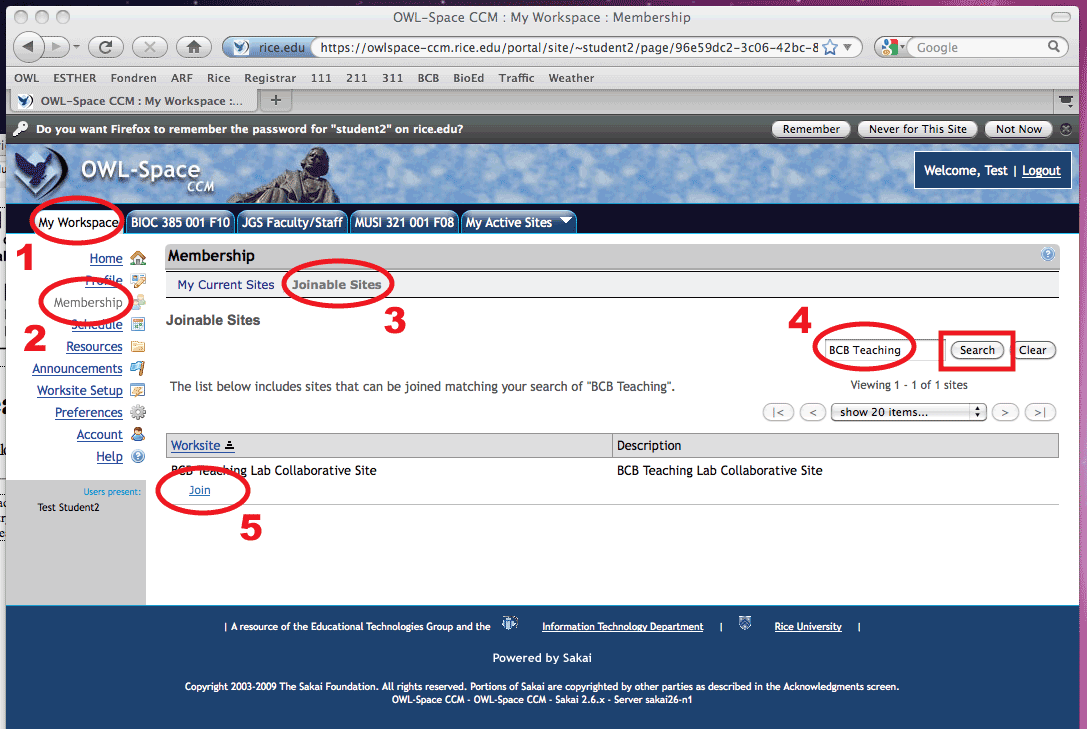
The signup form will be available for a limited period of time at the beginning of the fall semester and during the fall and spring preregistration periods. To get to the signup page, start by logging into Owlspace. Next, follow steps 1-5 to get to the signup survey form.
- Select the tab "My Workspace"
- Select "Membership"
- Click on "Joinable Sites"
- Type "BCB Teaching" into the search box and click on "search"
- If signups are open, then the BCB Teaching Lab Collaborative Site will appear as an available worksite. Click on "Join"
Once you have joined the site it will appear under My Active Sites the next time you log in, and thereafter until we close the site. For your convenience, the remaining steps are reproduced below the image.
- STEP 2: on the BCB Teaching Lab Collaborative Site complete and submit the Bioc
111 and 211 Signup Form under "Tests and Quizzes," then confirm that it is listed under Submitted Assessments in OWL-Space
- STEP 3: wait for us to contact you with instructions for taking the pre-lab
exam (if you have not taken it before) or confirmation that you are eligible
to pick up a signed special registration request form (if you took the exam
in a prior semester)
- STEP 4: after you have been notified of your status then please select
a section of the course you plan to take and pick up a preregistration form
from the appropriate instructor during scheduled office hours; have a back
up plan in case the section you want is full